
This add-on will add a “Field style” to CI Name field to indicate data compliance against the latest audit.
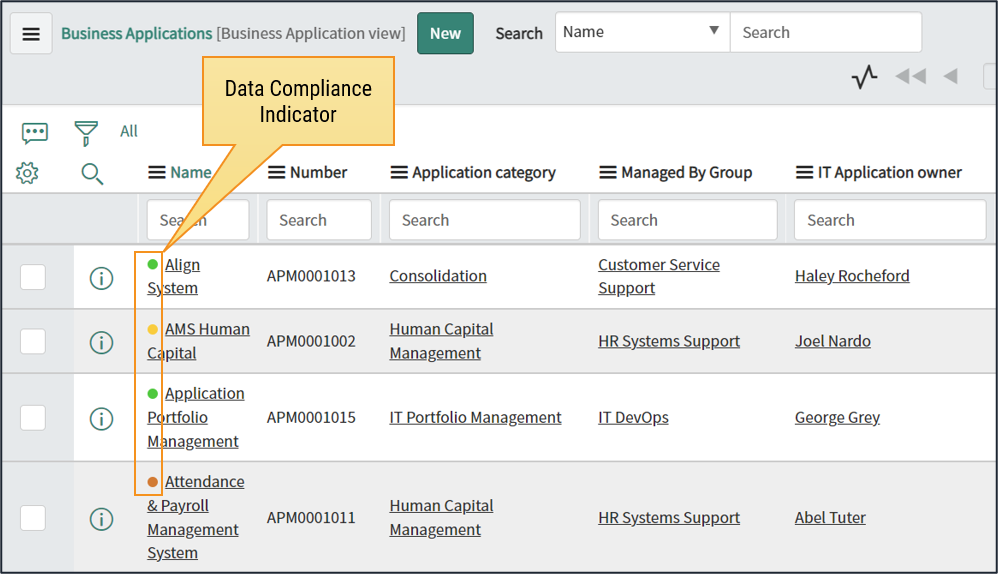
This add-on includes:
Script includes:
- DCMAuditCompliance – function for getting Audit results
Form Styles: 4 different form styles for different compliance percentage ranges
- <50 % = red
- 50 – 80 % = orange
- 80 – 99 % = yellow
- 100 % = green
Form styles are related to Configuration Item (cmdb_ci) table and therefore apply to all CI types.
Installation and Setup
Download the following update set and commit it to a Service instance which has DCM already installed.
How this works
- Four different styles are used to show the latest audit results for the root records.
- Only 100 compliant records will get the green mark.
- Records that do not have related audit results, do not show indicator at all.
- Styles are related to Configuration Item (cmdb_ci) table and therefore applies to all CI classes.
Tip! If you want to have similar indicators on other than CI tables, simply copy the “Field Styles” definitions for the cmdb_ci table to another table like spm_service_portfolio for example.