
DCM application includes its own user roles that control application module-based permissions to users. For example, permission to create new blueprints or run audits.
These roles alone will not allow users to create or modify any data within your instance that belong to other applications than DCM. The DCM application respects all Access Control List rules (ACL) configured in ServiceNow and DCM roles are simply used to provide access to different DCM modules.
The same applies to Cross-Scope Privileges that only give application-level access for DCM to “discuss” with other applications but will not override any ACLs.
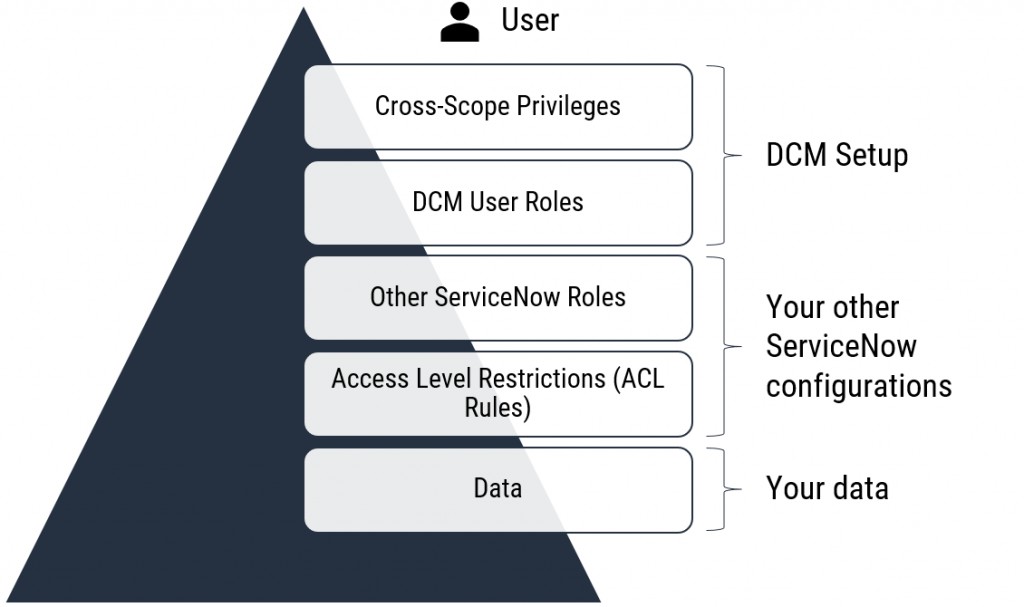
Users without the “Other ServiceNow Roles” cannot access or update any records in your ServiceNow instance just by having access to DCM.
DCM User Roles
DCM includes different user roles for managing blueprints, content sets, audits, and administrative tasks within the application.
Briefly, the DCM application has three types of user roles:
- Admin role: to configure the application and use any functionality within the app
- Module roles: can use specific modules within the application like the “Blueprint Designer,” for example
- Reader role: can read any record within the application
The following table will describe the DCM user roles (technical roles given in ServiceNow) in more detail:
| DCM / SNC Role | Business Role(s) | Role Description / Permissions |
|---|---|---|
| x_jugr_dcm.admin | DCM admin / key user | Users can do everything with DCM, including the setup and configuration of the product. |
| x_jugr_dcm.bp_user | Blueprint designer / Data architect / Data domain owner | Users can create, read and modify any blueprints or blueprint version. Creating and maintaining blueprints is usually centralized, and this role is given to only a handful of people. Other people can and should participate in designing blueprints, but usually, only a few people use Blueprint Designer. |
| x_jugr_dcm.dc_user | Data Content Planner | Users can create, read and modify a data content set. |
| x_jugr_dcm.task_manager | Task Manager | Users can create and update DCM Task Configurations. |
| x_jugr_dcm.task_user | Task Assignee | Users can work with DCM Tasks and complete. This is a supporting role and should be used together with other DCM roles. |
| x_jugr_dcm.auditor | Data auditor / architect | Users can create scheduled audits and run on-demand audits. This role is often combined with data architect or owner roles. |
| x_jugr_dcm.reader | Process users / Data consumers | Users who already have “process roles” in ServiceNow. Users can read any record in DCM and gets access to most of the DCM reports and dashboards, like the Audit Overview Dashboard. |
| x_jugr_dcm.data_provider | Data provider / steward / analyst | Users can access the “My Data Quality” dashboard to view personal data quality metrics. Users can work with Remediation Tasks, complete them, and update the statuses of Unique Audit Messages. Users can create, read, and modify a data content set. This role also gives access to the Data Providers section in the navigation menu. Note! This role does not give permission to commit changes related to the underlying data. The user still needs to have related roles to maintain CI records, for example, but “data providers” can plan changes without committing them. |
| x_jugr_dcm.data_owner | Data Domain Owner | Collection of other user roles targeted for Data Domain Owners. This also gives users access to the Data Owners section in the navigation menu. |
| x_jugr_dcm.ws_data_provider | Data provider / steward / analyst | Role for Data Providers who should have access to the Data Quality Workspace. |
A single person can have multiple user roles, such as Data architect or Domain owner and Data auditor.
Also, check the Recommended DCM roles for Training and Production use.
Note! The x_jugr_dcm.bp_manager role has been deprecated, and the x_jugr_dcm.bp_user role now has the same access rights as the manager role used to have. The same applies to x_jugr_dcm.dc_manager role, which has been deprecated as well.
Since DCM is a scoped application that utilizes REST APIs, there are some minimum permissions that every DCM user must have. Check the minimum required permissions from here.