
When cloning a production instance to sub-production instances, all data is overwritten by default. For most parts, this is OK, but in DCM, some system properties are instance-specific and should be preserved over cloning.
Data Preservation Rules are explained in more detail in ServiceNow Production documentation, but in this article we describe which data preservation rules should be created to preserve DCM license details and notification configs that are instance-specific.
Note! You must define data preservers on the source instance. Defining them on the target instance does not preserve the data.
ServiceNow Product Documentation
Create a Clone Data Preserver
Follow these steps to create a Clone Data Preserver into clone source instances (usually production) to preserve DCM license key, password, and license report value. System Administrator (admin) role is required to follow these steps.
- Make sure your Application Scope is set to Global. The preserver is created for System Properties (sys_properties) table, which belongs to the Global scope.
- Go to System Clone >> Clone Definition >> Preserve Data
- Click “New” to create a new Clone Data Preserver
- Give it a name, like “DCM Application Properties”
- Select Table as “System Properties” [sys_properties]
- Set condition to include following system properties: x_jugr_dcm.license.secret_key, x_jugr_dcm.license.password, x_jugr_dcm.license.send_report, x_jugr_dcm.notification.enable
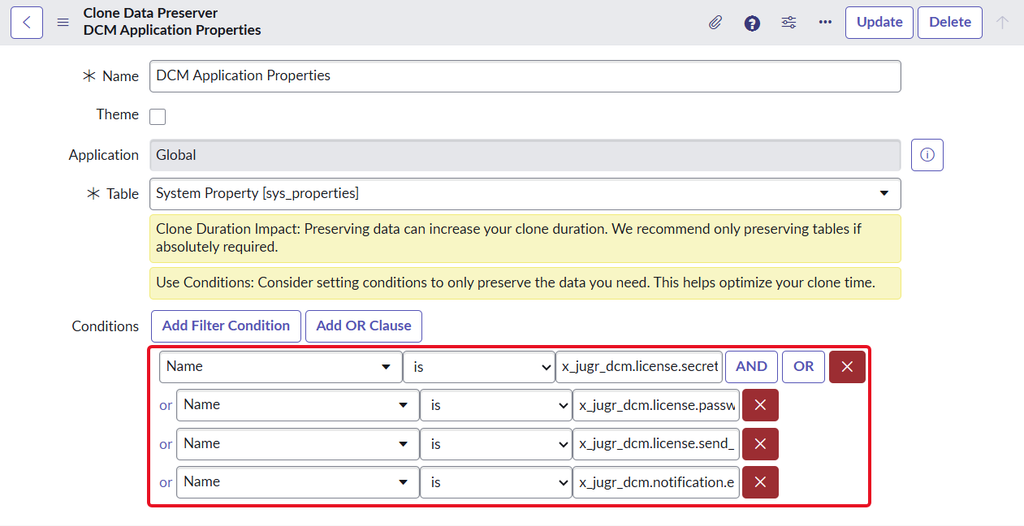
Example where condition is using the “Name is” condition together with OR operator.
You can use this Preserve Date record to preserve other DCM properties as well. Read more about the DCM System Properties here.